
in the digital age, where the landscape of work is continually evolving, the demand for flexible and efficient remote working solutions has never been higher. With the rise of remote work due to global events like the COVID-19 pandemic,businesses are increasingly turning to innovative technologies to support their operations. One such technology that has made significant waves is Windows Virtual Desktop. In this blog post, we’ll delve into the insights shared by scott Hanselman and Christiaan Brinkhoff on Azure Friday, where they explore the pivotal role Windows Virtual Desktop plays in enabling companies to seamlessly transition to remote working environments. We’ll uncover how this solution provides secure access to virtual workspaces from anywhere in the world, making it an essential tool for businesses seeking to adapt to the modern workforce’s needs. Join us as we navigate through the architecture, functionalities, and benefits of Windows Virtual Desktop, revealing why it’s become a lifeline for organizations aiming to maintain productivity and collaboration in an increasingly virtual world.
Understanding the Power of Windows Virtual Desktop in Remote Work
The rise of remote work, especially in light of global circumstances like the COVID-19 pandemic, has underscored the importance of flexible work solutions. Windows Virtual Desktop (WVD) stands out as a transformative technology, enabling organizations to provide employees with secure access to their workspaces from any location around the globe. Leveraging Azure’s vast infrastructure, businesses can deliver high-quality user experiences without the customary limitations of physical hardware.This solution not only meets the immediate needs for remote work but also ensures that companies can operate efficiently with minimal downtime, adapting quickly to the ever-evolving work habitat.
Unlike traditional methods of accessing a personal computer remotely, WVD offers a robust control plane that facilitates enterprise-level operations. Key features such as load balancing and multi-session support allow organizations to optimize resources and manage numerous users seamlessly. The distinct architecture of Windows Virtual Desktop differentiates it from standard virtual machines, providing a more integrated and scalable approach to virtualization. This means that businesses can onboard thousands of users rapidly,empowering them to access essential applications and data securely,as if they were using their office desktops. The cross-platform compatibility of WVD further enhances its value, allowing employees to connect from various devices, including Mac, Android, and Windows systems.
Key Benefits of Windows Virtual Desktop for Businesses
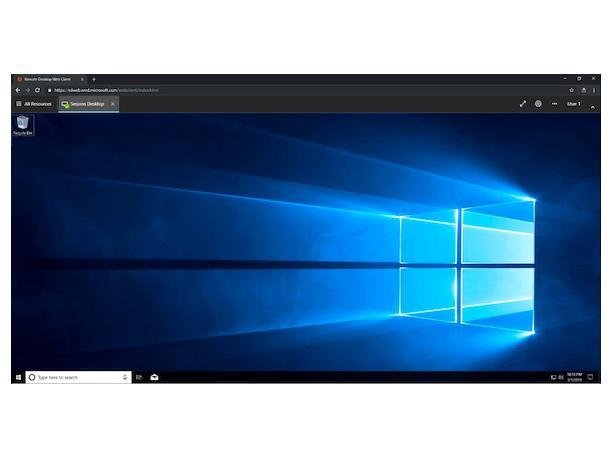
Windows Virtual Desktop (WVD) is revolutionizing remote work by providing a seamless and secure way for employees to access their virtualized desktops from anywhere in the world. As businesses increasingly shift to remote working models, WVD stands out by leveraging Azure’s global infrastructure. This means that employees can enjoy a consistent and efficient user experience irrespective of their location. The feature that sets WVD apart is its enterprise-ready capabilities, including load balancing and resource sharing. This allows organizations to provision thousands of virtual machines quickly and manage them effectively, ensuring that employees have access to the resources they need to maintain productivity.
One of the key advantages of WVD is its multi-session capabilities, enabling multiple users to share the same Windows 10 operating system instance without sacrificing performance. This not only optimizes resource utilization but also reduces the operational costs associated with maintaining separate physical machines for each user.Moreover, businesses can manage their virtual desktops through an intuitive control plane, making it easier to administer roles, diagnostics, and access controls. With WVD, the transition to remote work becomes not just a necessity but a streamlined process that enhances adaptability and responsiveness to today’s evolving workspace demands.
Enhancing Security and User Experience with Azure Technology

The integration of Azure technology within a remote work framework has revolutionized how businesses prioritize security and user engagement. **Windows Virtual Desktop (WVD)** serves as a cornerstone in this evolution, providing a secure workspace accessible from virtually anywhere. This capability is notably beneficial considering the increasing trend towards remote work, amplified by global circumstances like the COVID-19 pandemic. With WVD, organizations can effectively manage thousands of virtual machines, allowing employees to access their critical work environments securely and seamlessly, as if they were sitting at their desks in the office.
One of the standout features of Windows Virtual Desktop is its **enterprise-ready architecture**,which includes advanced functionalities such as load balancing and multi-session support. This means that resources can be shared effortlessly among users, thus enhancing efficiency while minimizing costs. Furthermore, the platform supports various operating systems, enabling users to connect through devices running Windows, Mac, or even Android. As businesses continue to adapt to the new normal, leveraging Azure technology like Windows Virtual Desktop not only fortifies security measures but also significantly enhances the user experience, creating a modern, flexible work environment that meets today’s challenges.
Best Practices for Implementing Windows Virtual Desktop in Your Organization

Implementing Windows Virtual Desktop (WVD) in your organization can significantly enhance flexibility and security, especially in an era where remote work is becoming the norm. One of the best practices is to **take advantage of Azure’s global infrastructure**. By utilizing Azure’s network,companies can ensure that their employees have a seamless experience while accessing their workspaces from anywhere in the world. This is particularly crucial in maintaining productivity during situations like the COVID-19 pandemic when many workers are required to be remote. Furthermore,organizations should focus on provisioning virtual machines in bulk,allowing for rapid deployment and scaling of resources to meet fluctuating demands.
Additionally, it’s essential to **leverage the unique features of Windows Virtual Desktop**, such as multi-session capabilities and centralized management. Unlike traditional virtual machines, WVD offers multi-session support, enabling multiple users to share resources efficiently without compromising performance. Companies should also implement thorough training for IT staff and end-users to familiarize them with managing and utilizing WVD effectively. To aid in these efforts, creating a structured plan that includes resource allocation, load balancing, and access control will ensure that your organization fully exploits the advantages of this technology.
| Best Practice | Description |
|---|---|
| Utilize Azure’s Global Network | Ensure seamless access to workspaces from anywhere. |
| Provision Resources in bulk | Scale and deploy virtual machines rapidly. |
| Implement Multi-Session Capability | Enable multiple users to share resources efficiently. |
| Provide Training | Educate IT staff and users on WVD management. |
Key Takeaways
the insights shared in today’s discussion shed light on the significant role that Windows Virtual Desktop (WVD) plays in the modern workspace,especially in light of the increasing need for remote work solutions. As we’ve learned from Christiaan Brinkhoff and Scott Hanselman, WVD not only provides a secure way for businesses to facilitate work-from-home arrangements, but it also empowers them with enterprise-level capabilities that go beyond traditional remote desktop setups. The ability to manage virtual machines on a large scale, share resources, and maintain control over the workspace from anywhere in the world makes WVD an invaluable tool in today’s business environment. Whether you’re a small company transitioning to remote work or a larger enterprise looking to optimize your operations, Windows Virtual desktop presents a flexible, efficient solution tailored for the contemporary workforce.As the demand for remote work continues to rise,embracing technologies like Windows Virtual Desktop will be crucial for businesses aiming to stay competitive and responsive. We encourage our readers to explore how WVD can transform their remote work strategies, enhancing productivity and collaboration across teams. Thank you for joining us in this exploration of Windows Virtual Desktop, and don’t forget to stay tuned for more insights on emerging technologies.
# How to Effectively Title Your YouTube Videos for Maximum Engagement
In the vast and ever-expanding realm of YouTube,content creators are constantly seeking ways to capture the attention of potential viewers. One crucial aspect of this endeavor revolves around the title of the video. A carefully chosen title can mean the difference between a video that garners millions of views and one that languishes in obscurity. However, the challenge many creators face is articulating the essence of their video succinctly and effectively. If you find yourself in need of assistance with titling your YouTube video, don’t worry; we’re here to guide you through the process.
## The Importance of a Compelling Title
A video title serves as the first impression for viewers and plays an integral role in determining click-through rates. An engaging title not only piques curiosity but also provides potential viewers with a clear understanding of what to expect. Titles should be reflective of the content while also being intriguing enough to motivate clicks. This strategic approach can significantly enhance the discoverability and engagement of your content.
## Steps to Crafting an Effective Video Title
1. **Identify Key Themes**: Begin by pinpointing the core themes or messages of your video. What are the primary subjects covered? What is the takeaway message for the viewers? Once you’ve highlighted these key aspects, you can start formulating a title that encapsulates them.
2. **Incorporate Keywords**: research relevant keywords related to your video topic. Utilizing tools like Google Trends or YouTube’s own search bar can provide insight into what potential viewers are searching for. Including these keywords in your title can improve searchability and increase the chances of your video being recommended.
3. **Keep It concise and Clear**: While creativity is essential, clarity should not be sacrificed. Aim for a title that is both concise and informative. A good rule of thumb is to keep the title under 60 characters, ensuring it’s easily readable and memorable.
4. **evoke Emotion or Curiosity**: Titles that evoke emotions or arouse curiosity are more likely to attract viewers. Consider using powerful adjectives, questions, or even exclamations to create an engaging hook. As a notable example, rather of a plain title like « Cooking Pasta, » you might try « Amazing Pasta Recipes That Will Blow Your Mind! »
5. **Test Variations**: Don’t hesitate to brainstorm multiple title options and test their effectiveness. Sometimes a small change can lead to significant differences in viewer engagement. Use A/B testing or analytics tools to evaluate which titles resonate more with your audience.
## Examples of Titles in Practice
To illustrate the above points, consider the following examples:
– If your video focuses on budget travel tips, a straightforward title like « Travel Tips for Budget Travelers » could be enhanced to « how to Travel the World on a Shoestring Budget! » This version is more engaging and explicitly communicates the content’s value.
– For a video about personal advancement, « Motivational Strategies for Success » might be revised to « Unlock Your Full Potential: 5 Must-No Strategies! » This not only piques interest but also sets a clear expectation for what the viewer will gain.
## Conclusion
the title of your YouTube video is a vital tool for attracting viewers and enhancing engagement. By carefully considering the themes of your content, utilizing keywords, maintaining clarity, and evoking emotion, you can craft compelling titles that stand out in a crowded marketplace. Remember, if you’re ever unsure about how to encapsulate your video’s message effectively, take the time to brainstorm and explore various title options. The right title may just be the key to unlocking your video’s full potential on the platform.
**Title: The Importance of Clear Dialog: Requesting Video Titles for Effective Engagement**
In the era of digital communication, the importance of clear and concise dialogue cannot be overstated. Whether in professional settings or casual exchanges, providing precise information is crucial for fostering effective interactions. This article will explore the necessity of explicitly communicating ideas, specifically within the context of discussing content on platforms like YouTube.
### The Context of the Request
Imagine a conversation in which an individual seeks to explore, critique, or reference a YouTube video. The interaction begins with enthusiasm, but a disconnect arises: the individual fails to provide the title of the video. This seemingly minor lapse could lead to a breakdown in communication, leaving the recipient unable to assist effectively. The prompt, « It seems that you haven’t provided the title of the YouTube video you’d like to discuss. Please share the title or main topics of the video, and I can help generate a suitable blog post title for you, » encapsulates a essential principle in communication – clarity is key.
### The Role of Titles in Digital Content
In the realm of online videos,the title serves as the first point of engagement between the content creator and the audience. A well-crafted title not only attracts viewers but also encapsulates the essence of the video, guiding expectations. When discussing or analyzing such content,it is imperative to reference the title accurately. Failure to do so may result in confusion and misinterpretation.
### Enhancing Engagement Through Explicit Communication
Clear requests for information, such as the one presented, facilitate better understanding and deeper engagement. The emphasis on providing either the title or the main topics of the video allows for a more tailored response, enabling a discussion that is relevant and informed. This practice not only enhances the quality of interactions but also promotes a culture of clarity and respect in communication.
### Implications for Content Creation and Interaction
Content creators and consumers alike can benefit from adhering to principles of clear communication. For creators, crafting engaging titles alongside meaningful content can lead to higher viewer retention and satisfaction. For consumers and viewers, articulating requests with specificity paves the way for more productive conversations, leading to enhanced learning and exchange of ideas.
### Conclusion
the importance of clear communication cannot be overstated, especially in the fast-paced, often fragmented world of digital media. Every interaction holds the potential to enrich dialogue and foster understanding. By encouraging individuals to provide clear, pertinent details – such as the title of a YouTube video – we pave the way for a more effective and engaging discourse.As we navigate various platforms and forms of communication, let us remember that clarity is not merely a courtesy; it is indeed a cornerstone of meaningful interaction.
Considering these considerations, if you are looking to discuss a specific YouTube video, take a moment to gather the relevant details. A simple request for a title or main topic could unlock avenues of engagement that or else remain closed. Clear communication is the bridge to effective dialogue and fruitful interactions in the digital age.