
In an era where remote work has become the new norm, the need for efficient and secure access to corporate resources has never been more critical. Enter Windows virtual desktop, a game-changing solution that leverages the power of Azure to provide seamless, global access to workspaces from anywhere in the world. In this blog post, we will dive into the insights shared by Christiaan Brinkhoff and Scott Hanselman in their enlightening conversation on azure Friday. They explore how Windows Virtual Desktop is transforming the landscape of remote work, enabling businesses to adapt quickly in response to challenges like the COVID-19 pandemic. From understanding the architecture behind Windows Virtual Desktop to its advantages over traditional remote access methods, we’ll discuss why this platform is pivotal for organizations looking to maintain productivity and security in a remote work environment. Join us as we unpack the key features that make Windows Virtual Desktop an indispensable tool for modern workplaces, ensuring that employees remain connected and engaged, no matter where they are.
Enhancing Remote Work Efficiency with Windows Virtual Desktop
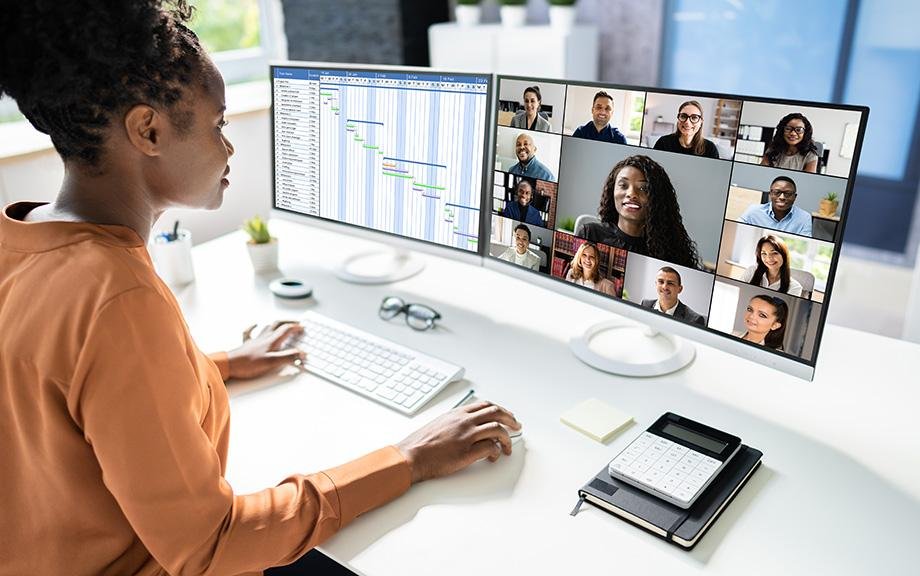
Windows Virtual Desktop has revolutionized the way businesses operate by providing a secure and efficient remote workspace accessible from anywhere in the world. Companies grappling with the transition to remote work, especially during the COVID-19 pandemic, have found this tool invaluable. The platform leverages the power of Azure to deliver an remarkable user experience, ensuring that employees can work seamlessly from their homes or any remote location. Businesses can quickly enable their workforce to operate from various devices, including Windows, Mac, and Androidfostering a flexible and adaptable work environment.
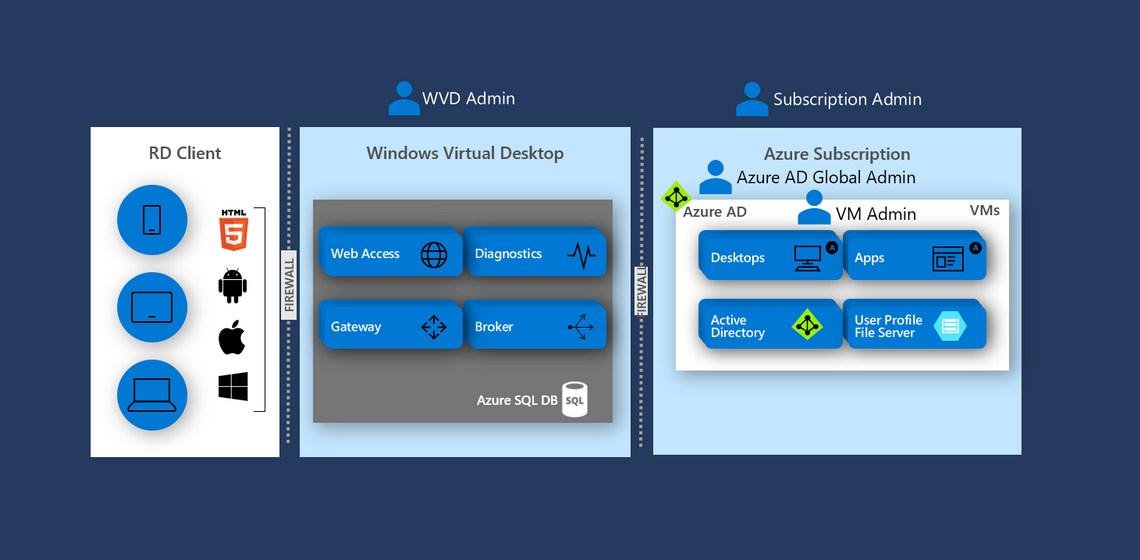
What sets Windows Virtual Desktop apart from conventional virtual machine setups is its enterprise-ready infrastructure designed for scalability and performance. The system is underpinned by a robust control plane that includes essential features such as load balancing, diagnostic gateway, and remote access.These capabilities allow companies to effortlessly manage thousands of virtual machines, providing employees with instant access to their workspaces, similar to their traditional desktops. This efficiency not only enhances productivity but also leads to meaningful cost savings by optimizing resource allocation and streamlining IT management processes.
Unlocking the Power of Azure for Seamless Workspace Access

In today’s fast-paced work environment, having the ability to access your workspace from virtually anywhere is essential for maintaining productivity and collaboration. With Windows Virtual Desktop, organizations can leverage Azure’s global infrastructure to provide secure remote access to their work environments. This capability not only facilitates a seamless experience for remote employees but also addresses the challenges posed by sudden shifts to remote work, such as those experienced during the COVID-19 pandemic. By allowing users to securely log into virtual machines from a variety of devices, businesses can ensure that employees remain connected and efficient, no matter where they are.
Furthermore, the architecture behind Windows Virtual Desktop sets it apart from traditional remote desktop solutions. With a dedicated control plane that manages roles such as access, diagnostics, and load balancing, it delivers an enterprise-ready solution that enhances scalability and performance.Companies can provision thousands of virtual desktops effortlessly and manage them with ease, ensuring that resources are shared optimally. This multi-session capability means that organizations can use a single operating system deployment for multiple users, greatly improving resource efficiency and policy management. The result is a work environment that is not only flexible and controllable but also strategically positioned to adapt to the ever-evolving demands of modern business.
Understanding the Key Differences Between Virtual Desktops and Traditional Approaches
Virtual desktops represent a significant shift from traditional computing methods,particularly in how users access and manage their work environments. Unlike conventional approaches, which typically require local hardware and geographical constraints, virtual desktops enable users to connect to their workspaces securely from virtually anywhere in the world. This technology harnesses the power of cloud computing platforms like Azure, facilitating an efficient remote working experience that has proven to be essential, especially during the rise of remote work scenarios due to events like COVID-19.
The architecture of virtual desktops provides unique advantages over standard virtual machine setups. As an example,**Windows Virtual Desktop** offers robust functionalities such as load balancing,multi-session capabilities,and centralized management,which are not usually available when one simply creates a virtual machine and accesses it remotely. This structured approach allows companies to provision thousands of virtual machines easily, ensuring that resources are shared effectively without the drawbacks of exclusive operating systems.The result is an enterprise-ready solution that streamlines operations and enhances versatility for businesses adapting to new digital workflows.
Best Practices for Companies Transitioning to Remote Work Solutions

Transitioning to remote work solutions can be challenging for many companies, but adopting robust technologies like **Windows Virtual Desktop** (WVD) can streamline this process significantly. By leveraging Azure’s global infrastructure, organizations can provide employees with secure access to their workspaces from anywhere in the world. The user experience is enhanced due to WVD’s ability to manage resources effectively, allowing firms to scale up and provision virtual machines, granting thousands of workers the access they need without the hassle of physical devices.This flexibility is essential in today’s landscape, where **working from home** has become a norm rather than an exception, especially in response to the **COVID-19** pandemic.
For a prosperous transition,companies shoudl implement a extensive strategy that includes employee training on using remote desktop technologies and ensuring adequate security protocols are in place. It’s crucial to encourage collaboration among teams using various platforms that WVD supports, such as **Windows, Mac, and android**. To facilitate an effective remote working environment, businesses should prioritize the establishment of a **control plane** that focuses on roles like **access management, load balancing**, and **diagnostics**. This infrastructure guarantees a smooth operational flow and maximizes productivity, balancing workloads efficiently while securing necessary data access across all user endpoints.
Key Takeaways
Windows Virtual Desktop has emerged as an indispensable tool for businesses navigating the challenges of remote work, especially in the wake of the global pandemic. As highlighted by Scott Hanselman and Christiaan Brinkhoff, this innovative solution not only provides seamless access to workspaces worldwide but also ensures that companies can maintain operational efficiency and security. The nuanced architecture of Windows Virtual Desktop sets it apart from conventional virtual machines, offering advanced features like load balancing and multi-session capabilities that significantly enhance the user experience. As organizations continue to adapt to new work environments, leveraging such technologies will be crucial. Embracing Windows Virtual Desktop can empower your workforce, allowing for flexible, secure, and efficient operations from anywhere. If you found this discussion enlightening, be sure to explore more about how virtual desktop solutions can transform your business landscape.