
In today’s fast-paced digital landscape, the way we work is evolving at an unprecedented rate. The rise of remote work, accelerated by global events, has prompted businesses to seek innovative solutions that can cater to their new operational needs. One such solution is the Windows Virtual Desktop, a powerful tool that promises to revolutionize how companies operate in a remote surroundings. In a recent episode of azure Friday, tech expert Scott Hanselman sat down with Christiaan Brinkhoff to explore the multifaceted capabilities of this platform. From its secure global access to its enterprise-ready features, Windows Virtual Desktop enables seamless connectivity and efficient workflows, allowing employees to access their workspaces from virtually anywhere in the world. In this post,we’ll delve into the key insights and discussions from their conversation,highlighting how this technology is not just a trend but a pivotal necessity for modern businesses looking to thrive in the era of remote work.
Understanding the Power of Windows Virtual Desktop for Remote Work
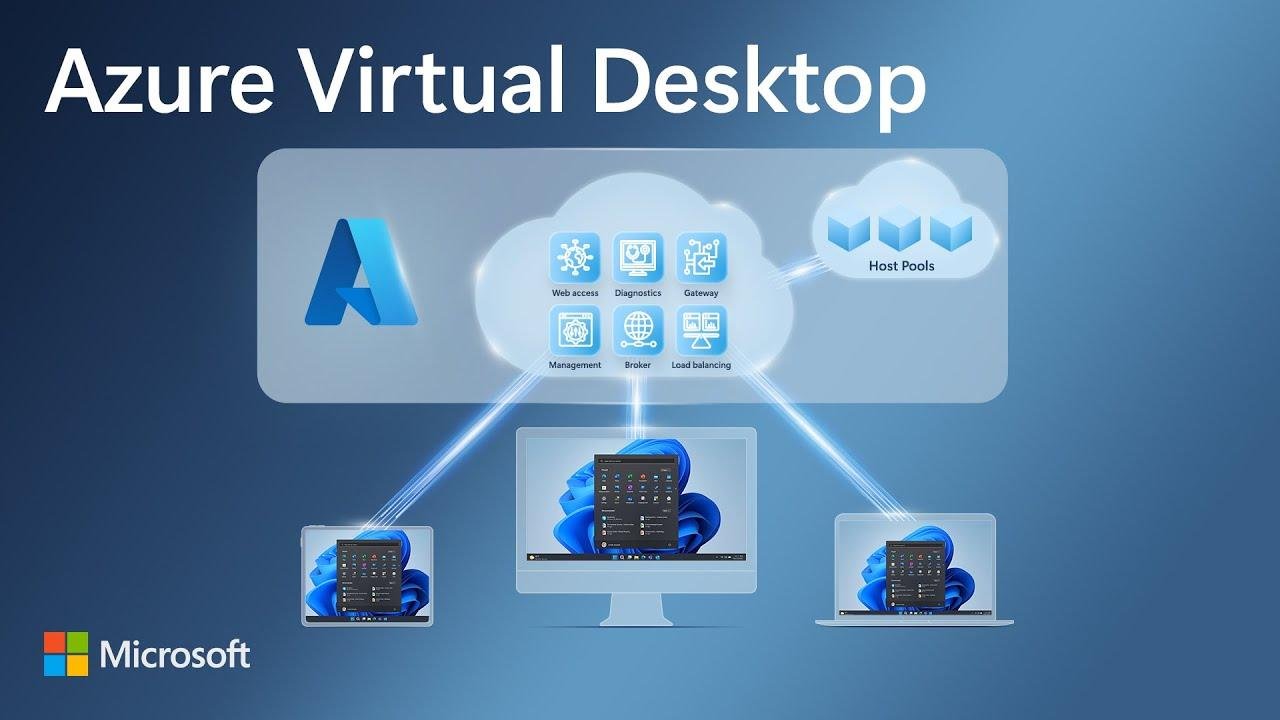
Windows Virtual Desktop revolutionizes remote work by providing a secure and flexible solution that enables users to access their workspaces from virtually anywhere in the world. By leveraging Azure’s global infrastructure, businesses can offer their employees a consistent and seamless experience. As the demand for remote work continues to rise,especially considering challenges like the COVID-19 pandemic,many companies have found themselves in urgent need of efficient solutions to support their workforce. Windows Virtual Desktop emerges as a pivotal tool, allowing organizations to implement remote work strategies quickly and effectively, ensuring productivity and collaboration without compromising security.
Unlike traditional methods of remote access, Windows Virtual Desktop stands out due to its enterprise-grade architecture, which supports features like load balancing and multi-session capabilities. this means organizations can provision thousands of virtual machines that are manageable and scalable, making it ideal for businesses that suddenly face a large number of remote employees. With support for various operating systems, employees can connect from their devices seamlessly-be it Windows, Mac, or Android.This cross-platform support further enhances the user experience, allowing teams to collaborate and maintain efficiency whether they’re in the office or working from home.
Exploring the Architecture and Features that Make Windows Virtual Desktop Enterprise-Ready
windows Virtual Desktop stands out as a transformative solution for organizations seeking to adapt to the demands of remote work. By leveraging Azure’s global infrastructureit facilitates secure access to workspaces from virtually any location. This capability has proven crucial, especially in the wake of COVID-19, were many companies were faced with the urgent need to enable their employees to work from home efficiently. Unlike traditional virtual machine setups, Windows Virtual Desktop provides a elegant architecture that includes a dedicated control planewhich manages essential functions such as load balancing and resource sharing.This turns the challenge of remote desktop virtualization into a seamless experience, allowing enterprises to scale their operations globally with ease.
One of the key features that makes Windows Virtual Desktop enterprise-ready is its ability to support multi-session Windows 10enabling companies to optimize their resource usage while maintaining high performance. This adaptability means that organizations can effectively provision thousands of virtual machines that mirror the workplaces their employees are accustomed to, without the need for physical hardware.Additionally, Windows Virtual Desktop is designed with compatibility in mind, allowing access from a wide range of operating systems including Mac, Android, and various Windows versions. with its robust architecture and rich feature set, it is evident that Windows Virtual Desktop is not just a temporary solution, but a cornerstone for the future of remote collaboration in the enterprise landscape.
How Windows Virtual Desktop Facilitates Secure Access to Workspaces from Anywhere
Windows Virtual Desktop revolutionizes how companies operate by offering a robust solution for secure access to workspaces regardless of location. With the backbone of Azure’s global infrastructure, organizations can ensure that their employees experience seamless connectivity and performance.This capability is especially crucial in today’s environment, where the demand for remote work has skyrocketed. By leveraging multi-session capabilities and effective load balancing, businesses can efficiently manage thousands of users accessing virtual machines, providing flexibility and maintaining productivity without the need for physical hardware.
Moreover, the platform’s control plane facilitates advanced management of resources, allowing IT departments to remotely provision and control virtual environments tailored to their specific needs. This unique architecture not only enhances security by centralizing access but also allows for compatibility across a variety of operating systems, including Windows, macOS, and Android. Employees can securely log into their virtual desktops from any device, ensuring continuity and enabling a versatile working environment that meets the modern institution’s needs.
Recommendations for Businesses Transitioning to Windows Virtual Desktop for Enhanced Productivity

Transitioning to Windows Virtual Desktop (WVD) offers businesses a robust solution to meet the challenges of modern remote work environments. With the ability to securely access workspaces from anywhere in the world, organizations can considerably enhance productivity while ensuring that their data remains safe. This is especially vital in the wake of the increased demand for remote work driven by recent global events. Companies can leverage Azure’s powerful infrastructure to deliver an optimal user experience, thereby facilitating seamless communication and collaboration among employees scattered across various locations.
To help businesses maximize the benefits of this transition, consider the following recommendations:
- Invest in training: Ensure that employees are well-versed in using Windows Virtual Desktop to minimize disruption during the transition.
- Optimize Network Infrastructure: Review and upgrade network capabilities to handle increased usage, ensuring stable and high-speed connections for remote workers.
- Utilize Multi-Session Capabilities: Take advantage of Windows 10 multi-session to reduce costs by efficiently sharing resources within the organization.
- Implement Security Protocols: Enforce strict security measures, such as multi-factor authentication, to protect sensitive information accessed through virtual desktops.
| Feature | Benefit |
|---|---|
| global Accessibility | Work from anywhere with an internet connection. |
| Resource Sharing | Multi-session capabilities allow efficient resource utilization. |
| Enhanced Security | Controlled access to sensitive information across devices. |
| Scalability | Easily provision thousands of virtual machines as needed. |
Closing Remarks
As we wrap up this exploration of Windows Virtual Desktop, it’s clear that this innovative technology is not just a trend but a crucial ally in today’s remote work environment.Fueled by the need for flexibility and security, Windows Virtual Desktop empowers companies to transition seamlessly to remote operations, ensuring that employees can access their workspaces from anywhere in the world. With features like the control plane, load balancing, and multi-session capabilities, businesses can now provision thousands of virtual machines efficiently, enabling a robust response to the challenges posed by situations like the COVID-19 pandemic. Christiaan Brinkhoff’s insights on Azure Friday shed light on how this solution stands apart from traditional virtual machines, offering enterprises the tools they need to thrive in a digital-first landscape.As organizations continue to adapt and evolve, it’s evident that embracing tools like Windows Virtual Desktop is no longer optional but essential. We hope this deep dive has provided you with valuable insights into how virtualized workspaces can transform your approach to remote work. Stay tuned for more discussions on the technologies shaping our future and how you can leverage them for your business success!